
 Chat with us on WhatsApp

Best Chair for Long Hours: What Seat Depth, Lumbar & Armrests Matter
If you spend most of the day at a desk, the chair matters less as a label and more as a fit decision. The main question is not whether a chair looks ergonomic. It is whether the seat depth, lumbar position and armrest adjustment match your body and desk setup. Those three areas usually decide whether a chair still feels supportive after six, eight or ten hours.
For most buyers, this is where confusion starts. Many chairs list adjustability, but not every adjustment is equally useful for long sessions. A chair can have a tall back and thick padding and still feel wrong if the seat is too deep, the lumbar sits in the wrong place, or the arms force your shoulders up. If you are still narrowing down options, Lakeland’s guide to buying an ergonomic office chair covers the wider decision process. This article focuses on the three features that usually make the biggest difference over long working days.
What matters most in a chair for long hours?
For long sitting sessions, the chair needs to support your lower back, let you sit fully into the backrest, and keep your arms in a relaxed working position. That usually means adjustable lumbar support, seat depth that matches your upper leg length, and armrests that do not force the shoulders up or out.
That sounds simple, but these features work together. If the seat is too deep, you will perch forward and lose contact with the backrest. If the lumbar sits too high or too low, it can feel intrusive rather than supportive. If the arms are fixed in the wrong place, your shoulders and wrists start compensating.
Seat depth is one of the most overlooked comfort checks
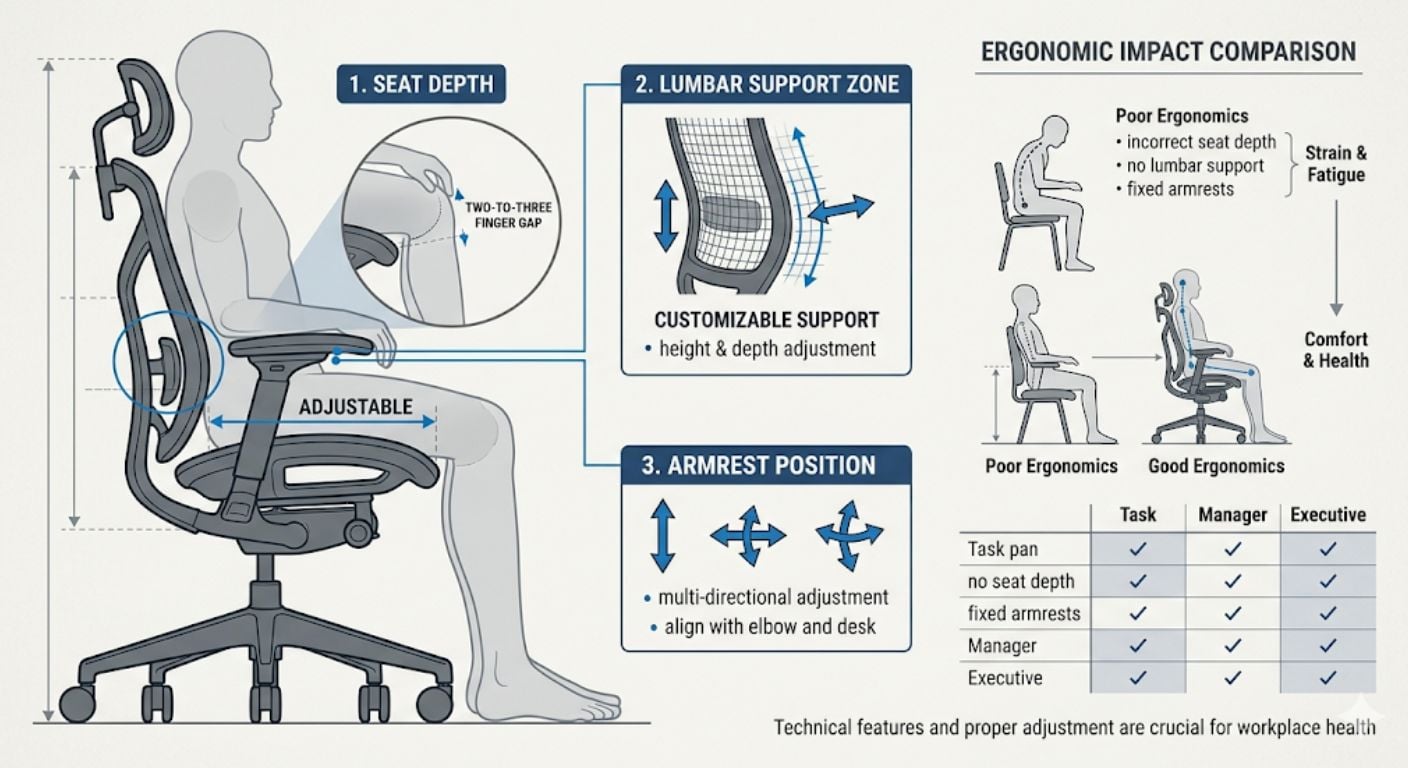
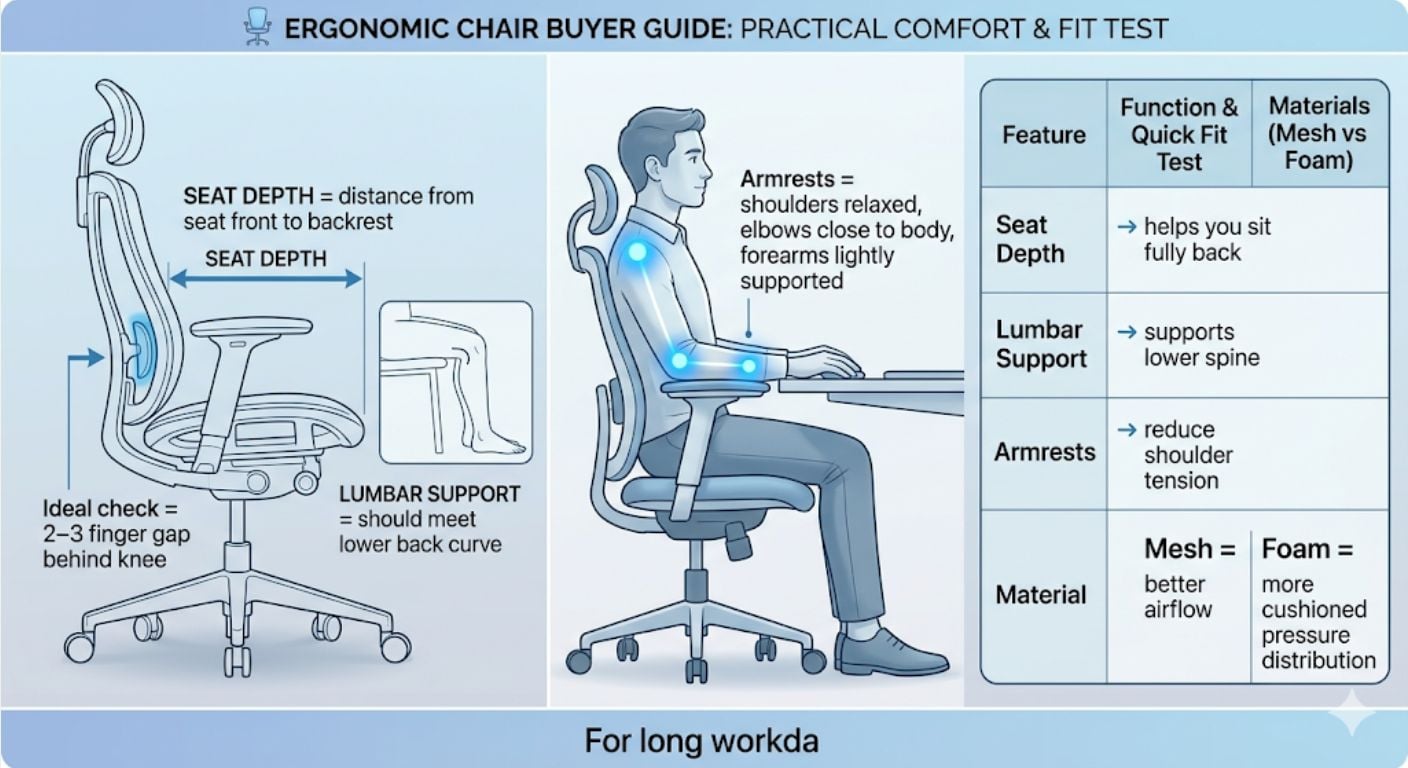
Seat depth is the distance from the front edge of the seat to the backrest. For long hours, it has a direct effect on comfort, circulation and posture.
A seat that is too deep pushes into the back of the knees and makes it harder to sit fully back. A seat that is too short can feel unstable because there is not enough support under the thighs. In both cases, the chair may look right on paper but still feel wrong after a full morning at the desk.
How to measure seat depth for an office chair
The simplest method is the two-to-three finger test:
- Sit all the way back into the chair.
- Keep your lower back against the backrest.
- Check the gap between the front edge of the seat and the back of your knee.
- If the gap is about two to three fingers wide, the depth is usually in the right range.
If there is no gap, the seat is probably too deep. If the gap is much larger, the seat may be too short.
You can also use a tape measure. Measure from the back of your buttocks to the back of your knee while seated. Then compare that number with the usable seat depth shown in the chair specification. A seat slider is useful if more than one person uses the chair, or if you are between standard size ranges.
When seat depth matters most
Seat depth becomes more important when:
- you work at a desk for most of the day
- you are particularly tall or petite
- you tend to slide forward in the chair
- you share one chair between different users
- you have had chairs that felt fine at first but uncomfortable after a few hours
If you want a broader explanation of how seat fit affects overall support, see this guide to lumbar, seat depth and support features.
Lumbar support matters, but only if it sits in the right place
Lumbar support should support the natural inward curve of the lower spine. In practical terms, it should meet your lower back rather than push into the mid-back or sit too low near the pelvis.
This is where buyers often go wrong. They assume any pronounced backrest shape will help. In reality, fixed shaping only works if it matches your body. For long hours, adjustable lumbar is usually the safer choice because it gives you more control over height and pressure.
What good lumbar support should do
A well-positioned lumbar section should:
- support the lower back without feeling aggressive
- help you stay back in the chair rather than leaning forward
- reduce the need to constantly shift position for relief
- work with the seat depth instead of compensating for it
What it should not do is feel like a hard lump. If a chair feels overly forceful in the lower back, that is often a fit issue rather than proof the support is effective.
Fixed vs adjustable lumbar for long workdays
Fixed lumbar can work if the chair shape suits your build. It is often simpler and less expensive. Adjustable lumbar is usually better for longer daily use because it gives you more tolerance if your proportions do not match a standard moulded back.
That is especially relevant if:
- more than one person will use the chair
- you are shorter or taller than average
- you work long desk-based days rather than occasional sessions
- you want a chair that can be fine-tuned over time
Armrests affect more than your arms
Armrests are often treated as a secondary feature, but they have a direct effect on shoulder tension, elbow position and wrist comfort.
For desk work, armrests should support the forearms lightly without pushing the shoulders upward. If the arms are too high, you end up shrugging. If they are too low, the shoulders and upper back do more work. If they are too wide, the elbows drift out and typing becomes less natural.
What to look for in armrests
For long hours, these are the most useful adjustments:
- Height adjustment: helps keep shoulders relaxed
- Width adjustment: helps position the elbows closer to the body
- Depth adjustment: useful if you move between typing and more open desk tasks
- Pivot or angle adjustment: helpful if you use multiple devices or prefer a slightly turned-in arm position
Not every buyer needs fully multi-directional arms. For many people, height and width are the most valuable adjustments. The point is not to chase the most complex spec list. It is to get enough control to match your desk setup.
Mesh vs foam seat for long hours
Neither material is automatically better. The better choice depends on whether you need more airflow or more cushioned pressure distribution.
Mesh seats and backs
Mesh is often chosen for airflow. It is useful in warmer rooms, for people who run hot, or for buyers who dislike heat build-up through the day. Mesh backs are common and can work well. Full mesh seats are more divisive because comfort depends heavily on tension quality and frame design.
Foam seats
A good foam seat usually gives a more familiar feel and can be better for pressure distribution over longer sessions. The key is density. Low-grade foam can flatten too quickly, while higher-density foam tends to hold its shape better under daily use.
For many buyers, the practical middle ground is a breathable back with a supportive foam seat. That gives airflow where it matters most while keeping a more stable seat base.
A quick comparison: which feature solves which problem?
| Feature | What it affects | Signs it matters for you |
|---|---|---|
| Seat depth | Thigh support, circulation, ability to sit back properly | Seat presses behind knees, you perch forward, you lose back contact |
| Lumbar support | Lower back support and seated posture | Lower back feels unsupported, you slump, you keep repositioning |
| Armrests | Shoulder, elbow and wrist position | Shoulders rise, elbows sit too far out, forearms lack support |
| Breathable materials | Heat build-up and comfort over time | You get warm quickly, room runs hot, padded chairs feel stuffy |
When this type of chair makes sense
A chair designed for longer daily use makes sense when:
- you sit for six hours or more on most workdays
- you work from home full-time or most of the week
- you know fixed dining-style or occasional desk seating is not enough
- you need adjustability because one-size seating has not worked well before
It is usually worth prioritising a more adjustable model if the chair will be used heavily. That does not always mean buying at the top end of the market. It means paying for the adjustments that affect fit rather than for styling extras.
When to avoid overcomplicating the decision
Not every buyer needs every adjustment. If you use the chair for shorter periods, a simpler model can still work well. Problems usually start when buyers pay for a long-hours brief but choose by appearance, padding thickness or generic product wording alone.
A practical shortlist for long daily use should answer four questions:
- Can the seat depth suit your leg length?
- Can the lumbar support your lower back properly?
- Can the armrests match your desk height and working position?
- Will the materials stay comfortable through a full day?
If the answer is unclear, keep looking.
Frequently Asked Questions
What is seat depth?
Seat depth is the distance from the front edge of the seat to the backrest. In a chair for long hours, it matters because it affects thigh support and whether you can sit fully back without pressure behind the knees.
How do I know if my office chair seat is too deep?
If you cannot sit back against the backrest without the seat pressing into the back of your knees, it is too deep. A useful quick check is the two-to-three finger gap between the seat edge and the back of the knee.
Are armrests necessary for long desk work?
Yes, if they are positioned correctly. Armrests help reduce load through the shoulders and upper back by lightly supporting the forearms. Poorly positioned armrests can do the opposite, so adjustability matters more than simply having them.
Is mesh or foam better for long sitting?
Mesh is generally better for airflow. Foam often gives a more cushioned feel and can be better for pressure distribution. For many people, a breathable back with a supportive foam seat is the most balanced option for daily use.

Final thoughts
For long desk-based days, comfort usually comes down to fit rather than category labels. Seat depth decides whether you can sit properly into the chair, lumbar support affects how well the lower back is supported, and armrests influence shoulder and arm position throughout the day.
If you are comparing options, start with those three checks before anything else. Lakeland’s range of ergonomic office chairs is a sensible next step if you want chairs built around adjustability, and the main ergonomic office chair buying guide covers the wider buying framework in more detail.


Comments