
 Chat with us on WhatsApp

Buying An Ergonomic Office Chair: What You Should Know
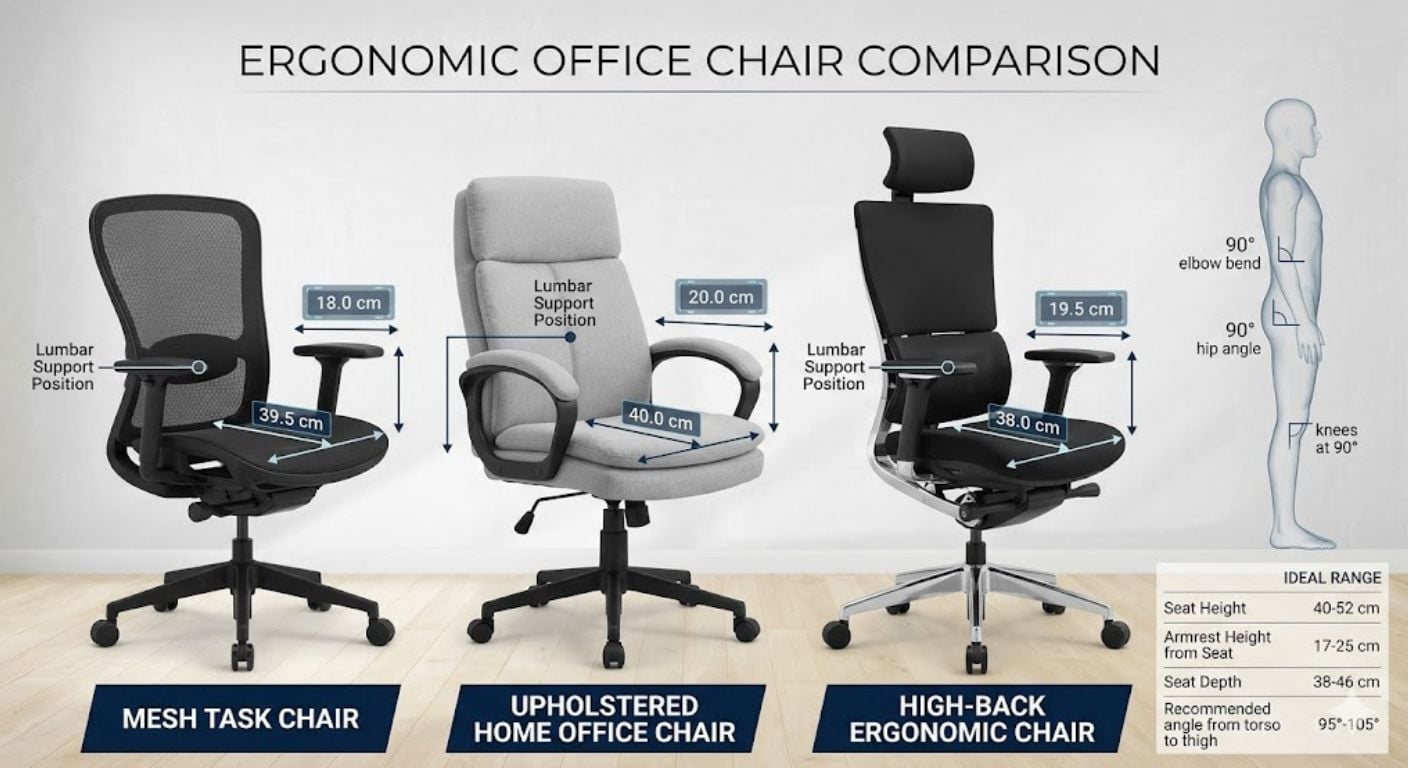
An ergonomic office chair is designed to support seated posture, movement, and workstation alignment over extended periods of desk use. The key difference between ergonomic seating and standard office seating is adjustability. A chair only becomes ergonomic when it can adapt correctly to the user’s height, leg length, desk setup, and sitting habits.
Buying the right ergonomic office chair is not simply about adding lumbar support or choosing a chair labelled “ergonomic”. Seat depth, arm positioning, movement, recline behaviour, material choice, and body fit all affect whether a chair remains comfortable after several hours of daily use.
This guide explains the features that matter, how to compare different ergonomic chair types, what specifications are genuinely useful, and which common buying mistakes cause discomfort or unnecessary returns. It also explains how ergonomic office chairs differ depending on work duration, workspace size, and user requirements.
If you are comparing different office seating styles, Lakeland’s office chairs collection includes ergonomic task chairs, upholstered home office seating, and adjustable desk chairs designed for everyday residential and light commercial use.
What Makes An Office Chair Ergonomic?
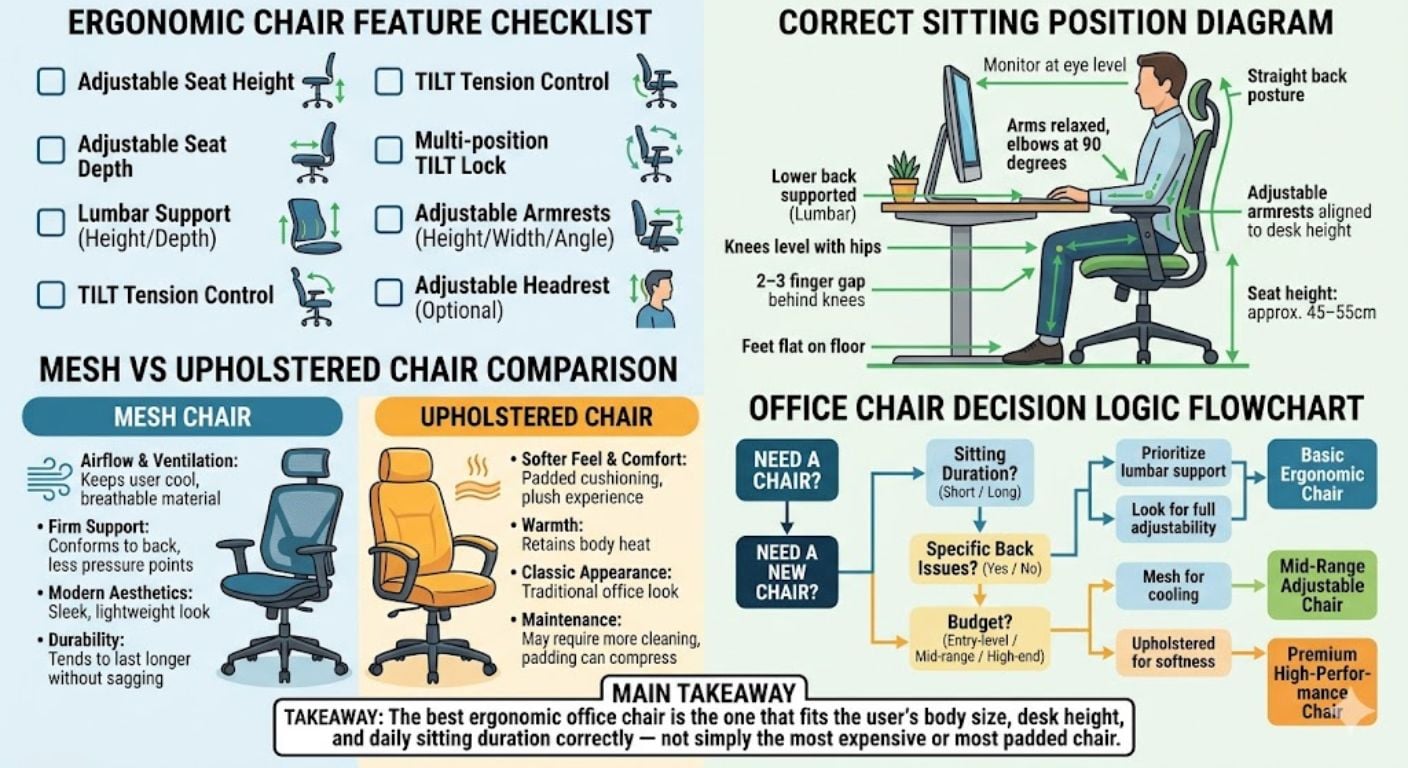
An office chair becomes ergonomic when it supports natural posture while allowing the user to move and adjust position throughout the day. Ergonomics is not one single feature. It is the combination of adjustability, body support, and workstation compatibility.
The most important ergonomic features are:
- Adjustable seat height
- Supportive backrest design
- Seat depth that suits leg length
- Armrests positioned correctly to desk height
- Controlled recline and movement support
- Stable swivel and base movement
- Suitable material breathability
According to the Canadian Centre for Occupational Health and Safety, a chair should adapt to the user rather than forcing the user into a fixed posture.
One of the biggest misunderstandings we see from our customers is assuming any padded office chair is ergonomic simply because it feels soft initially. Comfort during the first ten minutes and support after six hours are usually very different things.
Why Ergonomic Office Chairs Matter For Long-Term Desk Use
Static sitting places pressure on the lower back, hips, shoulders, and upper legs. Poor chair positioning can increase fatigue during desk work, especially during full-time home working or extended computer use.
An ergonomic office chair helps reduce:
- Lower back strain
- Forward shoulder posture
- Pressure behind the knees
- Neck tension from poor screen alignment
- Hip discomfort from unsupported seating angles
- Fatigue caused by static sitting positions
Ergonomic seating also encourages movement. Modern ergonomic design is based on dynamic sitting rather than forcing users into one rigid posture all day.
If you regularly work full-time from a desk, Lakeland’s guide to office chairs for long hours explains which features become more important during extended daily use.
The Most Important Ergonomic Office Chair Features
Seat Height Adjustment
Seat height determines whether your feet sit correctly on the floor and whether your knees align properly with the desk.
Most ergonomic office chairs use a gas-lift height adjustment system with a standard seat height range of approximately 45–55cm.
Correct positioning usually means:
- Feet flat on the floor
- Knees level with or slightly below hips
- Thighs supported without pressure under the knees
- Arms naturally aligned with desk height
Users under approximately 5'4" may require lower seat positioning or a footrest if the desk height cannot be adjusted.
Seat Depth
Seat depth affects thigh support and circulation. A seat that is too deep forces shorter users to lean forward instead of using the backrest properly.
Correct ergonomic seat depth leaves a small gap between the seat edge and the back of the knees.
As a general guide:
- 2–3 finger gap behind knees
- Full thigh support without edge pressure
- Back fully contacting backrest
Some ergonomic chairs include sliding seat depth adjustment for improved fit across different user heights.
For a more detailed breakdown of seat depth and back support behaviour, see Back Support Explained: Lumbar, Tilt & Seat Depth Simplified.
Backrest Support
A supportive backrest should follow the natural curve of the spine rather than sitting completely flat.
Backrest support normally varies between:
- Fixed curved support
- Adjustable lumbar positioning
- Flexible mesh support systems
- Dynamic recline support
High-back chairs may help users who spend long periods sitting upright during computer-based work, while mid-back chairs are often more suitable for smaller home office spaces.
Armrests
Armrests help reduce pressure on the shoulders and upper back by supporting part of the arm weight during seated work.
The most useful ergonomic armrests are height adjustable. Higher-end ergonomic chairs may also include:
- Width adjustment
- Depth adjustment
- Pivot movement
- Forward positioning
Armrests should support relaxed shoulders without forcing elbows outward or upward.
Movement And Recline
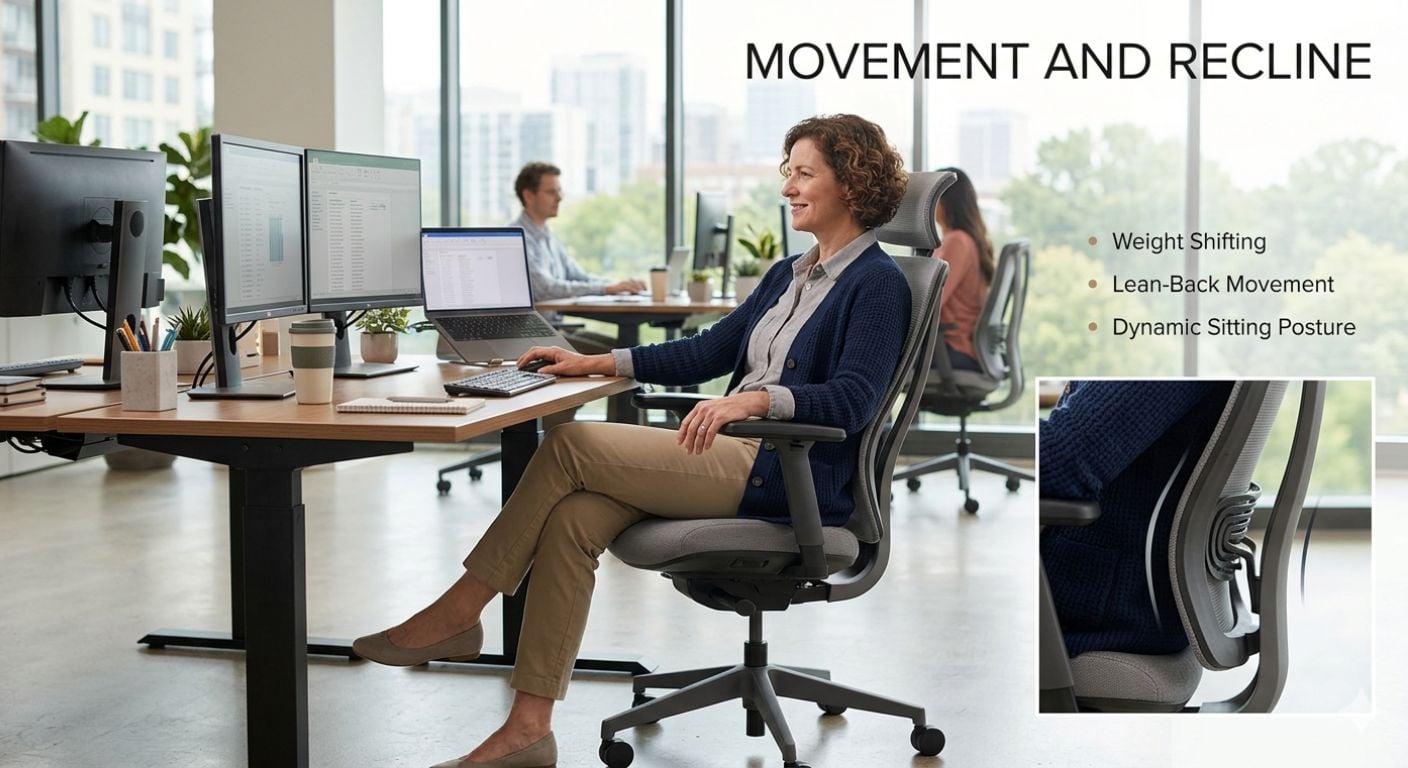
Good ergonomic seating supports movement throughout the day. Remaining completely static for long periods increases fatigue and pressure build-up.
Recline systems allow the chair back to move naturally with the user instead of locking posture into one fixed angle.
Movement-focused ergonomic chairs typically support:
- Weight shifting
- Lean-back movement
- Dynamic sitting posture
- Micro-adjustments during computer work
If you are comparing different movement styles, Swivel Vs Fixed Office Chairs explains how movement changes everyday usability.
Mesh Vs Upholstered Ergonomic Office Chairs
Material choice affects temperature control, firmness, maintenance, and long-term sitting feel.
| Feature | Mesh Office Chairs | Upholstered Office Chairs |
|---|---|---|
| Breathability | High airflow | Warmer seating feel |
| Support Feel | Firmer support | Softer cushioning |
| Heat Retention | Lower | Higher |
| Appearance | Technical/task style | More residential appearance |
| Long Sitting Sessions | Cooler during extended use | Softer initial comfort |
Mesh chairs are commonly preferred in warmer rooms or during full-time desk use because airflow reduces heat build-up. Upholstered chairs are often chosen for hybrid home office spaces where appearance matters alongside comfort.
If appearance is important within residential spaces, office chairs that do not look like office chairs explains how domestic-style seating differs from technical ergonomic task chairs.
How To Choose The Right Ergonomic Office Chair For Your Body Size
Many office chairs are designed around average-height users. Body proportions affect whether a chair fits correctly even when the product itself is well made.
For Shorter Users
- Lower minimum seat height
- Shallower seat depth
- Adjustable armrests
- Foot support if needed
For Taller Users
- Higher backrest support
- Longer seat depth
- Higher maximum seat height
- Greater weight capacity
For Shared Workspaces
Adjustability becomes more important if multiple users share the same chair. Height, arm position, and recline settings should be quick to change between users.
If the chair is primarily for younger users or study setups, Lakeland’s kids desk chair guide explains important sizing and safety considerations.
Are Expensive Ergonomic Office Chairs Worth It?
Higher-priced ergonomic office chairs usually improve adjustability, component durability, and movement systems rather than basic appearance alone.
More expensive ergonomic chairs often include:
- Better recline systems
- More adjustable armrests
- Higher-quality gas lifts
- Stronger frame construction
- Longer warranties
- Improved long-term foam durability
For occasional desk use, a simpler ergonomic chair may be sufficient. For daily 8+ hour use, better support systems and adjustment options become more valuable over time.
Extremely cheap office chairs often reduce adjustability and padding density first, which can affect comfort during longer sessions.
Gaming Chairs Vs Ergonomic Office Chairs
Gaming chairs and ergonomic office chairs are designed around different priorities.
| Feature | Gaming Chair | Ergonomic Office Chair |
|---|---|---|
| Design Focus | Visual styling | Long-term posture support |
| Seat Shape | Bucket-style seating | Open sitting posture |
| Movement Support | Often more restricted | Designed for movement |
| Long Work Sessions | Variable comfort | Usually better suited |
| Adjustability | Varies widely | Typically stronger |
Ergonomic office chairs are generally better suited for long working days because they prioritise posture adjustment and active sitting rather than fixed bucket-style positioning.
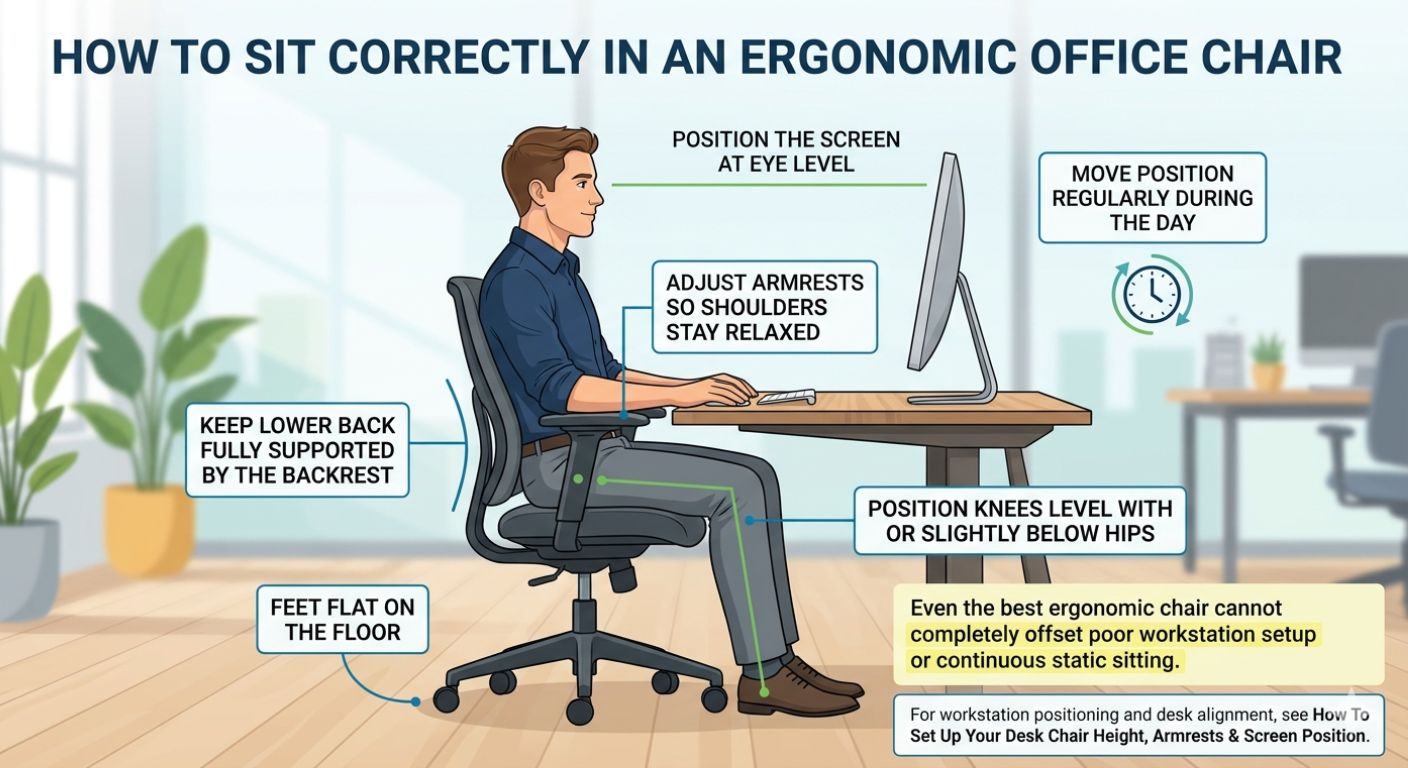
How To Sit Correctly In An Ergonomic Office Chair
- Keep feet flat on the floor
- Position knees level with or slightly below hips
- Keep lower back fully supported by the backrest
- Adjust armrests so shoulders stay relaxed
- Position the screen at eye level
- Move position regularly during the day
Even the best ergonomic chair cannot completely offset poor workstation setup or continuous static sitting.
For workstation positioning and desk alignment, see How To Set Up Your Desk Chair Height, Armrests & Screen Position.
Decision Logic: Which Ergonomic Office Chair Should You Choose?
- If you work 8+ hours daily, prioritise seat depth adjustment, recline movement, and adjustable armrests.
- If your workspace gets warm, choose mesh-backed ergonomic seating for improved airflow.
- If your office is part of a living space, upholstered ergonomic chairs usually blend better into residential interiors.
- If multiple people share the chair, choose highly adjustable height and armrest configurations.
- If you move frequently while working, prioritise swivel movement and dynamic recline support.
- If space is limited, avoid oversized executive chairs with large fixed arm widths.
- If you use hard flooring, chair base movement and wheel type become more important.
For users considering static alternatives, office chairs without wheels may suit smaller workspaces or fixed-position desk setups.
Frequently Asked Questions
What is an ergonomic office chair?
An ergonomic office chair is a chair designed to support posture, movement, and workstation alignment during seated desk work. The main feature is adjustability. Seat height, back support, armrests, and recline behaviour should adapt to the user rather than forcing the user into one fixed position.
Are ergonomic chairs comfortable?
Yes, but ergonomic comfort is usually based on support rather than softness alone. A chair that feels very soft initially may become uncomfortable during longer use if posture support is poor. Good ergonomic chairs balance support, pressure distribution, and movement.
Can an ergonomic chair help with back pain?
An ergonomic office chair may help reduce discomfort caused by poor sitting posture or unsupported desk setups. Features like proper lumbar positioning, movement support, and correct seat depth can improve sitting posture, although chairs alone do not solve every cause of back pain.
Is mesh or fabric better for an ergonomic office chair?
Mesh chairs usually provide better airflow and cooler seating during long working hours. Fabric and upholstered chairs often feel softer and may suit residential home office spaces better visually. The better option depends on room temperature, usage duration, and personal comfort preference.
How long should an ergonomic office chair last?
A good ergonomic office chair should last several years under normal residential use. Lifespan depends on build quality, adjustment mechanisms, foam density, and frequency of use. Chairs used full-time daily generally benefit from stronger frames and higher-quality movement systems.
What features matter most in an ergonomic office chair?
The most important ergonomic features are adjustable seat height, supportive backrest design, correct seat depth, adjustable armrests, and movement support. These features affect posture, comfort during longer sessions, and overall compatibility with different users and desk setups.
-

-
-
-
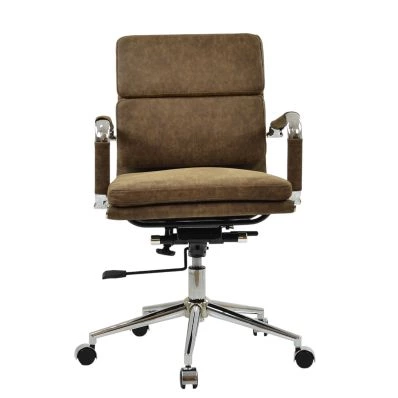 Chester Office Chair in Aged Brown LeatherSpecial Price £129.99 Regular Price £179.99 Original price 28% Inc VATSaving £50
 -
-
-
-
-
-
-
-
Summary: Ergonomic Office Chair Buying Rules
- Seat height should allow feet flat on the floor
- Leave a small gap behind the knees for correct seat depth
- Movement and recline matter during long desk sessions
- Mesh chairs improve airflow in warmer rooms
- Armrests should support relaxed shoulders
- Highly adjustable chairs suit shared workspaces better
- Large executive chairs are not always the best ergonomic option
- Soft padding alone does not equal ergonomic support
Common buying mistakes include choosing chairs based only on appearance, ignoring seat depth, buying oversized chairs for small desks, and assuming all ergonomic chairs suit every body type equally.
If you are comparing ergonomic seating styles for home offices, study spaces, or general desk use, Lakeland’s office chair collection includes adjustable office seating designed for practical everyday use across a wide range of desk environments.


Comments